
The Rave offers bespoke integration options, which allow you to integrate The Rave onto your site / store. By integrating with the rave, you are enabling your customers to have the best referral experience available.
- Our simple referral experience is generally shown to customers after they have have completed a purchase at your site (see below).
- Once the customer refers to their friend via a link, that friend is then redirected to your store. At this stage we append the URL with some metadata which shows that the customer has been referred via The Rave. (see more in Redirection)
- Generally this friend will be granted a discount (subject to how you configure The Rave).
- Once the friend completes their transaction, you will need to notify The Rave that the transaction has occurred (see more in Redemption)
- The Rave performs billing with your company, and disburses rewards to the original customer.
The Rave custom post-purchase widget is used to display an interactive experience to your customers after they have made a purchase. It facilitates serving the referral link to the user and prompts them to share and be reminded of your referral offer in future.
An example of the post-purchase widget is shown below:
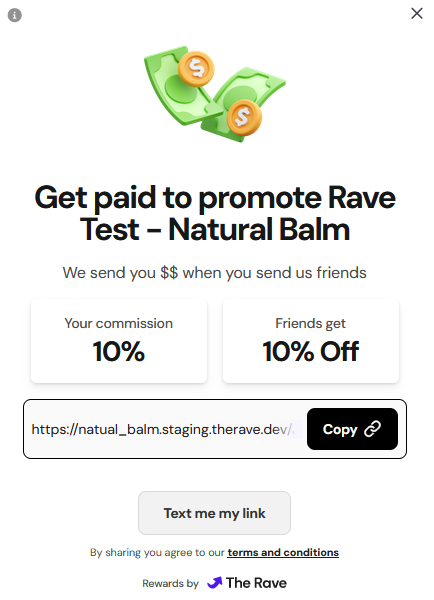
The widget supports operating in two modes:
- API-driven Mode: In this mode, you supply the widget with your
merchantIdand the Id of a referral link you created using The Rave API. The widget will then pull and display any required information automatically. - Script-driven Mode: In this mode, you populate a special global JavaScript object in your users browser with customer and order information, and the widget will create and serve the referral link on your behalf.
API-driven Mode is generally preferred for more granular control over your integration with The Rave. However, services powered by server-side rendering (e.g. PHP, Razor Pages etc.) may struggle to use this setup due to the additional page-load delay introduced by the API calls. For this reason, Script-driven Mode is provided as an alternative.
Before injecting the script in API-driven mode, you need to call out to The Rave API to:
- Create a customer record for the customer if one does not already exist. You should persist the returned
customerIdfor future use. - Create a referral for the customer. The returned
referralIdwill need to be provided to the widget.
You can then inject The Rave Post-Purchase Widget into your site by including the following HTML snippet at your desired rendering location. Note that the widget will occupy all the horizontal space you offer it, so you may need to perform some styling on the container.
<div id="rave_goesHere"></div>
<script src="https://scripts.therave.co/custom-post-purchase.js?merchantId={{YOUR_MERCHANT_ID}}&referralId={{CREATED_REFERRAL_ID}}">
Be sure to replace the {{YOUR_MERCHANT_ID}} and {{CREATED_REFERRAL_ID}}
placeholders with your actual merchant Id and referral Id.
If you are testing in our staging environment, simply exchange the hostname for the script
above with scripts.staging.therave.dev .
In Script-driven Mode, you populate a global JavaScript object with all the information The Rave needs to create a referral link for your customer. You then inject the script into your site.
An example of building up this object in JavaScript is shown below:
window._raveCustomIntegration = {
    customerEmailAddress: "john.smith@gmail.com",
    customerFirstName: "John",
    customerLastName: "Smith",
    customerIntegrationId: "YOUR_INTERNAL_CUSTOMER_ID",
    referralTitle: "White Sneakers",
    referralImageUrl: "https://cdn.someserver.com/img/1234.jpg",
    referralIntegrationId: "YOUR_INTERNAL_ORDER_ID"
};
JavaScript Parameters
| Parameter Name | Required | Details |
|---|---|---|
customerEmailAddress |
✅ | The email address of the customer who has just completed a transaction |
customerFirstName |
✅ | The first name of the customer who has just completed a transaction |
customerLastName |
❌ | The last name of the customer who has just completed a transaction |
customerIntegrationId |
❌ | A unique identifier for the customer who has just completed a transaction |
referralIntegrationId |
✅ | A unique order id for your order |
referralTitle |
❌ | If you want to provide a custom title for the referrral (which appear in link unfurls) |
referralImageUrl |
❌ | If you want to provide a custom image for the referral (which appear in link unfurls) |
You can then inject The Rave Post-Purchase Widget into your site by including the following HTML snippet at your desired rendering location. Note that the widget will occupy all the horizontal space you offer it, so you may need to perform some styling on the container.
<div id="rave_goesHere"></div>
<script src="https://scripts.therave.co/custom-post-purchase.js?merchantId={{YOUR_MERCHANT_ID}}">
Be sure to replace the {{YOUR_MERCHANT_ID}} placeholders with your actual merchant Id.
If you are testing in our staging environment, simply exchange the hostname for the script
above with scripts.staging.therave.dev .
When a referred customer is redirected to your site from The Rave, they will be redirected to your site with a query string parameter of (rave=[referralId]). The [referralId] is a unique id which is atttributed to the original sharer of the link. This code will need to be passed back to The Rave (see create redemption), once the referred customer has completed their transaction.
Create a new Customer
Used to create a new Customer entity with The Rave. A Customer is a representation of a person who will refer or be referred.
Request Body schema: application/json
| integrationId | string An identifier from the integrators platform to associate with The Rave |
| emailAddress | string |
| firstName | string |
| lastName | string |
Responses
Request samples
- Payload
{- "integrationId": "5496b8d9-0919-4362-816f-55656cd2b4c4",
- "emailAddress": "john.smith@gmail.com",
- "firstName": "John",
- "lastName": "Smith"
}Response samples
- 201
{- "id": "01d39db5-ef73-49fd-8f0b-6d1e0d0daea1",
- "integrationId": "5496b8d9-0919-4362-816f-55656cd2b4c4",
- "emailAddress": "john.smith@gmail.com",
- "firstName": "John",
- "lastName": "Smith"
}Get the details of an existing Customer
Used to retrieve the details of an existing Customer by their ID.
path Parameters
| customerId required | string Example: 01d39db5-ef73-49fd-8f0b-6d1e0d0daea1 |
Responses
Response samples
- 200
{- "id": "01d39db5-ef73-49fd-8f0b-6d1e0d0daea1",
- "integrationId": "5496b8d9-0919-4362-816f-55656cd2b4c4",
- "emailAddress": "john.smith@gmail.com",
- "firstName": "John",
- "lastName": "Smith"
}Create a new Referral
Used to create a new Referral entity with The Rave. A Referral is a representation of a customer's intent to refer. It has a one-to-many relationship with Redemptions.
Request Body schema: application/json
| title | string A short title/description displayed to customers in their Rave portal. Usually some text to remind customers where this referral originated from. |
| imageUrl | string or null This image, if supplied, is displayed to customers in their Rave portal. Optional. |
| destinationUrl | string The URL that customers will be directed to when they want to redeem this referral. |
| customerId | string The ID of the customer that this referral belongs to. |
| integrationId | string or null An identifier from the integrators platform to associate with The Referral |
| policyVersionId | string The ID of a Rave PolicyVersion to use to determine what rewards are earned by the customer |
Responses
Request samples
- Payload
{- "title": "White Sneakers",
- "customerId": "01d39db5-ef73-49fd-8f0b-6d1e0d0daea1",
- "integrationId": "623987b7-53aa-471c-9a77-67bdb9318005",
- "policyVersionId": "b65e496d-f051-4761-89c3-4da229ce16e9"
}
Response samples
- 201
{- "id": "fabc1471-8b46-40e0-9e26-3bb9edc00b39",
- "expiry": "2024-11-28T21:53:29Z",
- "title": "White Sneakers",
- "customerId": "01d39db5-ef73-49fd-8f0b-6d1e0d0daea1",
- "integrationId": "623987b7-53aa-471c-9a77-67bdb9318005",
- "policyVersionId": "b65e496d-f051-4761-89c3-4da229ce16e9"
}Get the details of an existing Referral
Used to retrieve the details of an existing Referral by its ID.
path Parameters
| referralId required | string Example: fabc1471-8b46-40e0-9e26-3bb9edc00b39 |
Responses
Response samples
- 200
{- "id": "fabc1471-8b46-40e0-9e26-3bb9edc00b39",
- "expiry": "2024-11-28T21:53:29Z",
- "title": "White Sneakers",
- "customerId": "01d39db5-ef73-49fd-8f0b-6d1e0d0daea1",
- "integrationId": "623987b7-53aa-471c-9a77-67bdb9318005",
- "policyVersionId": "b65e496d-f051-4761-89c3-4da229ce16e9"
}Lists all Referrals for a Customer.
A paginated endpoint that lists all Referrals for a Customer. Referrals will be returned by their creation date in descending order. The returned property nextCursor should be supplied as the cursor in the next call to keep iterating over pages. If nextCursor is null, there are no more pages. This endpoint will only 404 when the cursor query parameter is larger than zero.
path Parameters
| customerId required | string Example: 01d39db5-ef73-49fd-8f0b-6d1e0d0daea1 |
query Parameters
| cursor | integer Example: cursor=0 |
Responses
Response samples
- 200
{- "results": [
- {
- "id": "fabc1471-8b46-40e0-9e26-3bb9edc00b39",
- "expiry": "2024-11-28T21:53:29Z",
- "title": "White Sneakers",
- "customerId": "01d39db5-ef73-49fd-8f0b-6d1e0d0daea1",
- "integrationId": "623987b7-53aa-471c-9a77-67bdb9318005",
- "policyVersionId": "b65e496d-f051-4761-89c3-4da229ce16e9"
}
], - "nextCursor": 1
}Create a new Redemption
Used to create a new Redemption stemming from a Referral. A Redemption represents a successful transaction that took place due to one customer referring another. The creation of a Redemption triggers rewards for the first customer.
Request Body schema: application/json
| referralId | string The ID of the Referral that triggered this Redemption. |
| redeemingCustomerId | string The ID of the customer that is redeeming the referral. This should not be the ID of the customer that owns the referral. |
| orderValue | number The value of the order before applying the referral discount. |
| discountAmount | number The value of the discount that was subsequently applied to the order value. |
| integrationId | string or null An identifier from the integrators platform to associate with the Redemption |
Responses
Request samples
- Payload
{- "referralId": "fabc1471-8b46-40e0-9e26-3bb9edc00b39",
- "redeemingCustomerId": "01d39db5-ef73-49fd-8f0b-6d1e0d0daea1",
- "orderValue": 149.99,
- "discountAmount": 20,
- "integrationId": "d58cf3c3-78ca-4481-a303-efbe8c3f8188"
}Response samples
- 201
{- "id": "62fe0311-7dee-46c3-8f87-9de63e827585",
- "referralId": "fabc1471-8b46-40e0-9e26-3bb9edc00b39",
- "redeemingCustomerId": "01d39db5-ef73-49fd-8f0b-6d1e0d0daea1",
- "orderValue": 149.99,
- "discountAmount": 20,
- "integrationId": "d58cf3c3-78ca-4481-a303-efbe8c3f8188"
}Get the details of an existing Redemption
Used to retrieve the details of an existing Redemption by its ID.
path Parameters
| redemptionId required | string Example: 62fe0311-7dee-46c3-8f87-9de63e827585 |
Responses
Response samples
- 200
{- "id": "62fe0311-7dee-46c3-8f87-9de63e827585",
- "referralId": "fabc1471-8b46-40e0-9e26-3bb9edc00b39",
- "redeemingCustomerId": "01d39db5-ef73-49fd-8f0b-6d1e0d0daea1",
- "orderValue": 149.99,
- "discountAmount": 20,
- "integrationId": "d58cf3c3-78ca-4481-a303-efbe8c3f8188"
}Create a new Refund
Used to record a Refund against a Redemption. This will alter the rewards received by the referring customer if required.
Request Body schema: application/json
| redemptionId | string The ID of the Redemption that this Refund is for. |
| refundAmount | number The total amount of the refund. |
Responses
Request samples
- Payload
{- "redemptionId": "62fe0311-7dee-46c3-8f87-9de63e827585",
- "refundAmount": 49.99
}Response samples
- 201
{- "id": "045cf07a-0b13-4a72-b995-559e6579182f",
- "preRefundOrderValue": 149.99,
- "postRefundOrderValue": 100,
- "redemptionId": "62fe0311-7dee-46c3-8f87-9de63e827585",
- "refundAmount": 49.99
}Get the details of an existing Refund
Used to retrieve the details of an existing Refund by its ID.
path Parameters
| refundId required | string Example: 62fe0311-7dee-46c3-8f87-9de63e827585 |
Responses
Response samples
- 200
{- "id": "045cf07a-0b13-4a72-b995-559e6579182f",
- "preRefundOrderValue": 149.99,
- "postRefundOrderValue": 100,
- "redemptionId": "62fe0311-7dee-46c3-8f87-9de63e827585",
- "refundAmount": 49.99
}